AdvancedRepeaterForm Component Documentation

English Version


1. Overview

The AdvancedRepeaterForm is a powerful and highly configurable Vue.js component designed to manage a list of items within a table. It provides a complete, self-contained CRUD (Create, Read, Update, Delete) interface with multiple UI modes (Panel, Modal, Inline-edit). Its key features include:
  • Flexible Data Display: Renders items in a table format.
  • Multiple Edit Modes: Supports top-panel, modal, and inline editing.
  • CRUD Operations: Built-in functions for adding, editing, and removing items.
  • Customizable Forms: Uses a scoped form slot to inject any form layout.
  • Customizable Cells: Uses a cell slot for custom rendering of table data.
  • External Validation: A validator prop allows hooking into parent-level validation libraries like VeeValidate.
  • Event-Driven: Emits events (onformchange, onitemchange) for parent components to react to state changes.
  • ACL Integration: Props like canAdd, canEdit, canDelete allow easy integration with backend permission systems to control user actions.
  • Advanced Features: Includes reordering (drag-and-drop), import/export, and DMS integration hooks.

2. Core Concepts

The component is designed to be configured from a parent Vue instance, often generated by a backend system (like Laravel with YAML definitions).
  1. Backend-Driven Configuration: The component’s props and behavior are typically defined in a YAML file on the server. The server-side code (e.g., a Blade template) reads this YAML and renders the <advanced-repeater-form> tag with the appropriate props.
  2. Data Binding: The main list of items is passed via the :items.sync prop. Any changes made inside the repeater (add, remove, reorder) will automatically update the parent’s data.
  3. Form Injection: The form for creating/editing items is not part of the repeater. You must provide it via the #form slot. This gives you complete control over the form’s layout, fields, and components.
  4. Scoped Slot formObject: The #form slot provides a crucial property called formObject. This is a reactive reference to the item currently being edited. Any changes you make to formObject in your slotted form are instantly reflected in the repeater’s state. This is the key to dependent field calculations.
  5. Validation: Validation is handled by the parent. You wrap your slotted form in a ValidationObserver and pass a validation function to the repeater’s :validator prop.
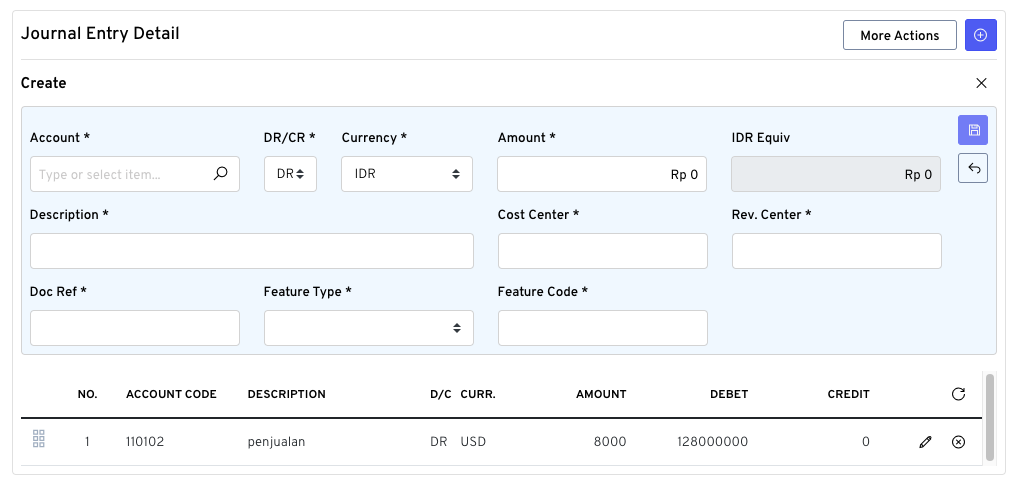
UI

Default Basic

Advanced Repeater Form - Basic

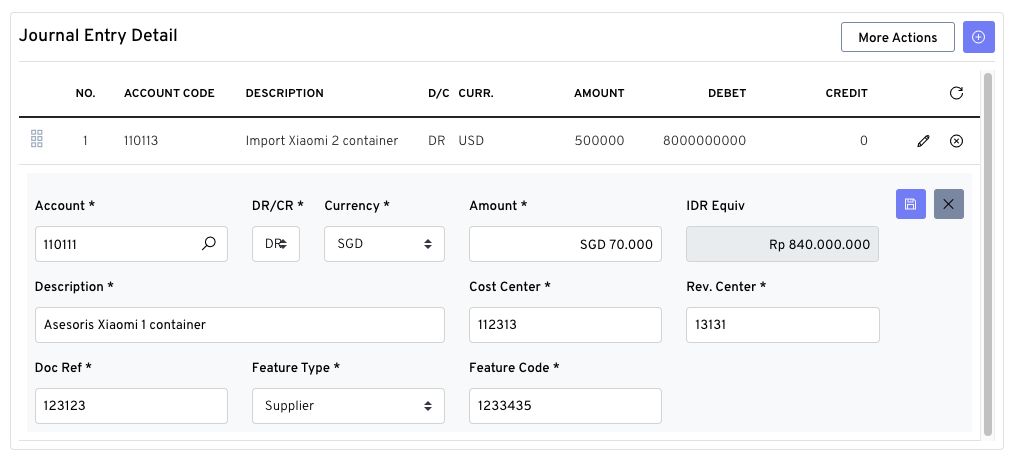
Inline Item Editing

Advanced Repeater Form - Inline Edit

3. Props

PropTypeDefaultDescription
Core Props
itemsArray[](Required) The array of objects to display and manage. Use .sync for two-way binding.
colsArray[](Required) An array of column definition objects ({ key, label, ... }).
objectDefaultObject{}(Required) An object representing the default state for a new item.
labelString'Items'The title label displayed in the header.
validatorFunctionnull(Crucial for Validation) An async function or a function that returns a Promise<boolean>. The repeater will await this function before saving an item.
Access Control (ACL) Props
canAddBooleantrueControls visibility of the “Add New Item” button. Set via backend ACL.
canEditBooleantrueControls visibility of the “Edit” button for each row. Set via backend ACL.
canDeleteBooleantrueControls visibility of the “Remove” button for each row. Set via backend ACL.
canUploadBooleantrueControls visibility of the “More Actions” dropdown for importing data. Set via backend ACL.
UI & Behavior Props
modalFormBooleanfalseIf true, the form will appear in a modal dialog instead of the panel.
inlineEditBooleanfalseIf true, the form will appear directly in the table row when editing.
reorderableBooleanfalseIf true, enables drag-and-drop reordering of rows.
...otherProps--Other props for UI customization.

4. Slots

Slot NameScoped PropsDescription
#formformObject, formMode, formParams(Required) The content for the create/edit form. Place your form fields and validation logic here.
#cellrow, column, value, indexAllows for completely custom rendering of a table cell, overriding the default display.

5. Implementation Guide

Here is a step-by-step guide based on your provided example.
Step 0: Backend Configuration (YAML)
Configuration begins on the server. A YAML file defines all the necessary props for the component. The backend will parse this file to render the component tag in the Blade view.
# In your form definition YAML file
-
    label: "Journal Entry Detail"
    name: entryDetail
    type: advancedrepeaterform
    model: entryDetail

    # ACL properties - These should be set by your backend based on user permissions.
    # For example, in PHP: 'canAdd' => $user->can('create-journal-entry'),
    canAdd: true
    canEdit: true
    canDelete: true
    canUpload: false # Example: Disabling upload for this user role

    # Event handlers and validator function names
    on_form_change: handleFormChange # Binds to @onformchange
    on_item_change: detailCalc       # Binds to @onitemchange
    validator: validateEntryDetailForm # Binds to :validator

    # Blade template for the form injected into the #form slot
    form_template: fas.gl.journalentry._entry_detail_form

    # UI/UX settings
    inline_edit: true
    reorderable: true
    ordered: true
Step 1: Parent Component data Setup
In your parent Vue component’s data option, define the properties that correspond to the model and objectDefault in your YAML.
data() {
    return {
        // Corresponds to `model: entryDetail` in YAML. Bound with :items.sync
        entryDetail: [],

        // Used for :object-default. This is the template for a new item.
        entryDetailObjDef: {
            accountCode: null,
            entryType: 'DR',
            currency: 'IDR',
            amount: 0,
            idrEquiv: 0,
            description: ''
            // ... other fields initialized to their default values
        },

        // Data for business logic (e.g., exchange rates)
        exchangeRates: { 'IDR': 1, 'USD': 15500, 'EUR': 16800 },

        // Data for summary calculations
        amountDebit: 0,
        amountCredit: 0,
        balance: 'Balance'
    };
},
Step 2: Parent Component methods Setup
Define the methods that will handle validation, calculations, and events, matching the names in your YAML.
methods: {
    /**
     * Validator Function (name from `validator` in YAML)
     * Connects the repeater's "Save" button to your form's VeeValidate observer.
     */
    validateEntryDetailForm() {
        return this.$refs.journalEntryDetailsFormObserver.validate();
    },

    /**
     * Dependent Field Calculation (triggered from the slot template)
     */
    calculateIdrEquiv(formObject) {
        const rate = this.exchangeRates[formObject.currency] || 1;
        const amount = formObject.amount || 0;
        formObject.idrEquiv = amount * rate;
    },

    /**
     * Handler for `onitemchange` (name from `on_item_change` in YAML)
     * Ideal for recalculating totals for the entire list.
     */
    detailCalc(items) {
        // ... calculation logic from your example ...
        this.amountDebit = totalD;
        this.amountCredit = totalK;
        // ...
    },

    /**
     * Handler for `onformchange` (name from `on_form_change` in YAML)
     */
    handleFormChange(formObject) {
        console.log('Form data is changing:', formObject);
    }
}
Step 3: Slotted Form Template
Your form template (defined in form_template in YAML) should contain the ValidationObserver and the event listeners.
<!-- The ref MUST match the one used in your validator method (e.g., journalEntryDetailsFormObserver) -->
<validation-observer ref="journalEntryDetailsFormObserver">
    <div id="journalEntryDetails">
        <!-- ... form fields ... -->
        <currency-input
            v-model="formObject.amount"
            @input="calculateIdrEquiv(formObject)"
            ...
        />
        <currency-input
            v-model="formObject.idrEquiv"
            :disabled="true"
            ...
        />
        <!-- ... other form fields ... -->
    </div>
</validation-observer>

Bahasa Indonesia


1. Gambaran Umum

AdvancedRepeaterForm adalah komponen Vue.js yang andal dan dapat dikonfigurasi, dirancang untuk mengelola daftar item dalam tabel. Komponen ini menyediakan antarmuka CRUD (Create, Read, Update, Delete) yang lengkap dengan beberapa mode UI (Panel, Modal, Inline-edit). Fitur utamanya meliputi:
  • Tampilan Data Fleksibel: Merender item dalam format tabel.
  • Mode Edit Beragam: Mendukung pengeditan melalui panel, modal, dan inline.
  • Operasi CRUD: Fungsi bawaan untuk menambah, mengedit, dan menghapus item.
  • Formulir Kustom: Menggunakan slot form untuk menyisipkan tata letak formulir apa pun.
  • Sel Kustom: Menggunakan slot cell untuk kustomisasi rendering data tabel.
  • Validasi Eksternal: Properti validator memungkinkan koneksi ke pustaka validasi di level induk.
  • Berbasis Event: Mengirimkan event (onformchange, onitemchange) agar komponen induk dapat bereaksi.
  • Integrasi ACL: Properti seperti canAdd, canEdit, canDelete memungkinkan integrasi mudah dengan sistem perizinan di backend untuk mengontrol aksi pengguna.
  • Fitur Lanjutan: Termasuk pengurutan ulang (drag-and-drop), impor/ekspor, dan lainnya.

2. Konsep Inti

Komponen ini dirancang untuk dikonfigurasi dari instance Vue induk, yang sering kali dihasilkan oleh sistem backend (seperti Laravel dengan definisi YAML).
  1. Konfigurasi Berbasis Backend: Properti dan perilaku komponen biasanya didefinisikan dalam file YAML di server. Kode sisi server (misalnya, template Blade) membaca YAML ini dan merender tag <advanced-repeater-form> dengan properti yang sesuai.
  2. Data Binding: Daftar item dioper melalui properti :items.sync. Perubahan di dalam repeater akan secara otomatis memperbarui data di induk.
  3. Injeksi Formulir: Formulir untuk membuat/mengedit item disediakan melalui slot #form, memberikan kontrol penuh atas tata letak formulir.
  4. Scoped Slot formObject: Slot #form menyediakan properti formObject, sebuah referensi reaktif ke item yang sedang diedit. Ini adalah kunci untuk kalkulasi bidang yang saling bergantung.
  5. Validasi: Validasi ditangani oleh induk. Anda membungkus formulir slot dengan ValidationObserver dan memberikan fungsi validasi ke properti :validator.

3. Properti (Props)

PropertiTipeDefaultDeskripsi
Properti Inti
itemsArray[](Wajib) Array objek untuk ditampilkan. Gunakan .sync.
colsArray[](Wajib) Array objek definisi kolom.
objectDefaultObject{}(Wajib) Objek yang merepresentasikan state default untuk item baru.
labelString'Items'Label judul yang ditampilkan di header.
validatorFunctionnull(Penting untuk Validasi) Sebuah fungsi async yang mengembalikan Promise<boolean>.
Properti Kontrol Akses (ACL)
canAddBooleantrueMengontrol visibilitas tombol “Tambah Item”. Diatur oleh ACL backend.
canEditBooleantrueMengontrol visibilitas tombol “Edit” di setiap baris. Diatur oleh ACL backend.
canDeleteBooleantrueMengontrol visibilitas tombol “Hapus” di setiap baris. Diatur oleh ACL backend.
canUploadBooleantrueMengontrol visibilitas dropdown “More Actions” untuk impor data. Diatur oleh ACL backend.
Properti UI & Perilaku
modalFormBooleanfalseJika true, formulir akan muncul dalam modal.
inlineEditBooleanfalseJika true, formulir akan muncul secara inline di tabel saat mengedit.
reorderableBooleanfalseJika true, mengaktifkan pengurutan ulang dengan drag-and-drop.
...otherProps--Properti lain untuk kustomisasi UI.

4. Slot

Nama SlotProperti LingkupDeskripsi
#formformObject, formMode, formParams(Wajib) Konten untuk formulir buat/edit.
#cellrow, column, value, indexMemungkinkan rendering sel tabel yang sepenuhnya kustom.

5. Panduan Implementasi

Berikut adalah panduan langkah demi langkah berdasarkan contoh Anda.
Langkah 0: Konfigurasi Backend (YAML)
Konfigurasi dimulai di server. File YAML mendefinisikan semua properti yang dibutuhkan komponen. Backend akan mem-parsing file ini untuk merender tag komponen di view Blade.
# Di dalam file definisi form YAML Anda
-
    label: "Journal Entry Detail"
    name: entryDetail
    type: advancedrepeaterform
    model: entryDetail

    # Properti ACL - Ini harus diatur oleh backend Anda berdasarkan izin pengguna.
    # Contoh di PHP: 'canAdd' => $user->can('create-journal-entry'),
    canAdd: true
    canEdit: true
    canDelete: true
    canUpload: false # Contoh: Menonaktifkan upload untuk peran pengguna ini

    # Nama handler event dan fungsi validator
    on_form_change: handleFormChange # Terhubung ke @onformchange
    on_item_change: detailCalc       # Terhubung ke @onitemchange
    validator: validateEntryDetailForm # Terhubung ke :validator

    # Template Blade untuk formulir yang diinjeksi ke slot #form
    form_template: fas.gl.journalentry._entry_detail_form

    # Pengaturan UI/UX
    inline_edit: true
    reorderable: true
    ordered: true
Langkah 1: Pengaturan data Komponen Induk
Di dalam opsi data komponen Vue induk, definisikan properti yang sesuai dengan model dan objectDefault di YAML Anda.
data() {
    return {
        // Sesuai dengan `model: entryDetail` di YAML. Terhubung dengan :items.sync
        entryDetail: [],

        // Digunakan untuk :object-default. Ini adalah template untuk item baru.
        entryDetailObjDef: {
            accountCode: null,
            entryType: 'DR',
            currency: 'IDR',
            amount: 0,
            idrEquiv: 0,
            description: ''
            // ... field lain diinisialisasi dengan nilai defaultnya
        },

        // Data untuk logika bisnis (misal: kurs mata uang)
        exchangeRates: { 'IDR': 1, 'USD': 15500, 'EUR': 16800 },

        // Data untuk kalkulasi ringkasan
        amountDebit: 0,
        amountCredit: 0,
        balance: 'Balance'
    };
},
Langkah 2: Pengaturan methods Komponen Induk
Definisikan method yang akan menangani validasi, kalkulasi, dan event, sesuaikan namanya dengan yang ada di YAML.
methods: {
    /**
     * Fungsi Validator (nama dari `validator` di YAML)
     * Menghubungkan tombol "Save" repeater ke observer VeeValidate di formulir Anda.
     */
    validateEntryDetailForm() {
        return this.$refs.journalEntryDetailsFormObserver.validate();
    },

    /**
     * Kalkulasi Bidang Terkait (dipicu dari template slot)
     */
    calculateIdrEquiv(formObject) {
        const rate = this.exchangeRates[formObject.currency] || 1;
        const amount = formObject.amount || 0;
        formObject.idrEquiv = amount * rate;
    },

    /**
     * Handler untuk `onitemchange` (nama dari `on_item_change` di YAML)
     * Ideal untuk menghitung ulang total untuk seluruh daftar.
     */
    detailCalc(items) {
        // ... logika kalkulasi dari contoh Anda ...
        this.amountDebit = totalD;
        this.amountCredit = totalK;
        // ...
    },

    /**
     * Handler untuk `onformchange` (nama dari `on_form_change` di YAML)
     */
    handleFormChange(formObject) {
        console.log('Data form sedang berubah:', formObject);
    }
}
Langkah 3: Template Slot Formulir
Template formulir Anda (didefinisikan di form_template dalam YAML) harus berisi ValidationObserver dan event listener.
<!-- Ref ini WAJIB cocok dengan yang digunakan di method validator Anda -->
<validation-observer ref="journalEntryDetailsFormObserver">
    <div id="journalEntryDetails">
        <!-- ... field formulir ... -->
        <currency-input
            v-model="formObject.amount"
            @input="calculateIdrEquiv(formObject)"
            ...
        />
        <currency-input
            v-model="formObject.idrEquiv"
            :disabled="true"
            ...
        />
        <!-- ... field formulir lainnya ... -->
    </div>
</validation-observer>